Install the server
At the end of this page you will have a running Tandem server — Postgres, the API and the web app — reachable over HTTPS through a reverse proxy, with a superadmin account, a registration mode you chose, and nightly backups running.
Before you start
- An x86-64 Linux host with Docker and Docker Compose installed, and 4 GB of memory to give the stack (2 GB is enough for a small library; a library of a couple of thousand books runs the server near 2.5 GB plus Postgres).
- Disk for your ebook and audiobook library, plus a separate mount (ideally on a NAS) for backups — a backup on the same disk as everything else is worthless if that disk dies.
- A hostname you control, if you plan to put the server on the internet behind TLS.
- Somewhere to transcribe audiobooks, if you want cross-format sync — covered on Set up transcription. The server runs without it; you get a library and two readers, not synced positions.
Steps
1. Copy the templates
docker-compose.yml and .env are gitignored, so your local copies never conflict with the
tracked templates when you pull updates:
cp docker-compose.example.yml docker-compose.yml
cp .env.example .env
2. Create the secret files
The JWT signing key, the Postgres password and the credential encryption keys are not set as
environment variables — anything in environment: is printed in full by docker inspect and
readable in /proc/1/environ. Each value lives in its own file under secrets/, which Compose
mounts read-only at /run/secrets/:
cd secrets
umask 077
python3 -c "import secrets; print(secrets.token_urlsafe(64))" > jwt_secret_key
python3 -c "import secrets; print(secrets.token_urlsafe(32))" > postgres_password
python3 -c 'from cryptography.fernet import Fernet; print(Fernet.generate_key().decode())' > credential_enc_keys
cd ..
umask 077 in the same shell as the redirects is what keeps each file readable only by you.
3. Edit docker-compose.yml
Point the ebook, audiobook and backup volume mounts at your real paths, and set CORS_ORIGINS
to your web origin — startup refuses the wildcard default. .env carries only PUID/PGID:
Compose has to resolve those before any container exists, so they can't come from a secret file.
Set them to whoever owns your library on the host:
stat -c '%u:%g' /path/to/your/ebooks
# .env
PUID=1000
PGID=1000
4. Bring the stack up
docker compose up --build
The server applies its Alembic migrations on start, so there is no separate schema step.
Note
Run the server service as a single process — no --workers, no WEB_CONCURRENCY, no
second replica. The transcription queue and the backup scheduler are process-local, so a
second worker duplicates jobs instead of sharing them, and the server refuses to boot if
asked to run more than one.
5. Get the superadmin password
A fresh database creates one superadmin, admin, with a randomly generated password written to
the log:
docker compose logs server | grep -i superadmin
Log in and you are sent straight to a forced password-reset screen — the account is flagged
must_reset_password, and the server refuses every other route until it is changed.
6. Decide how people sign up
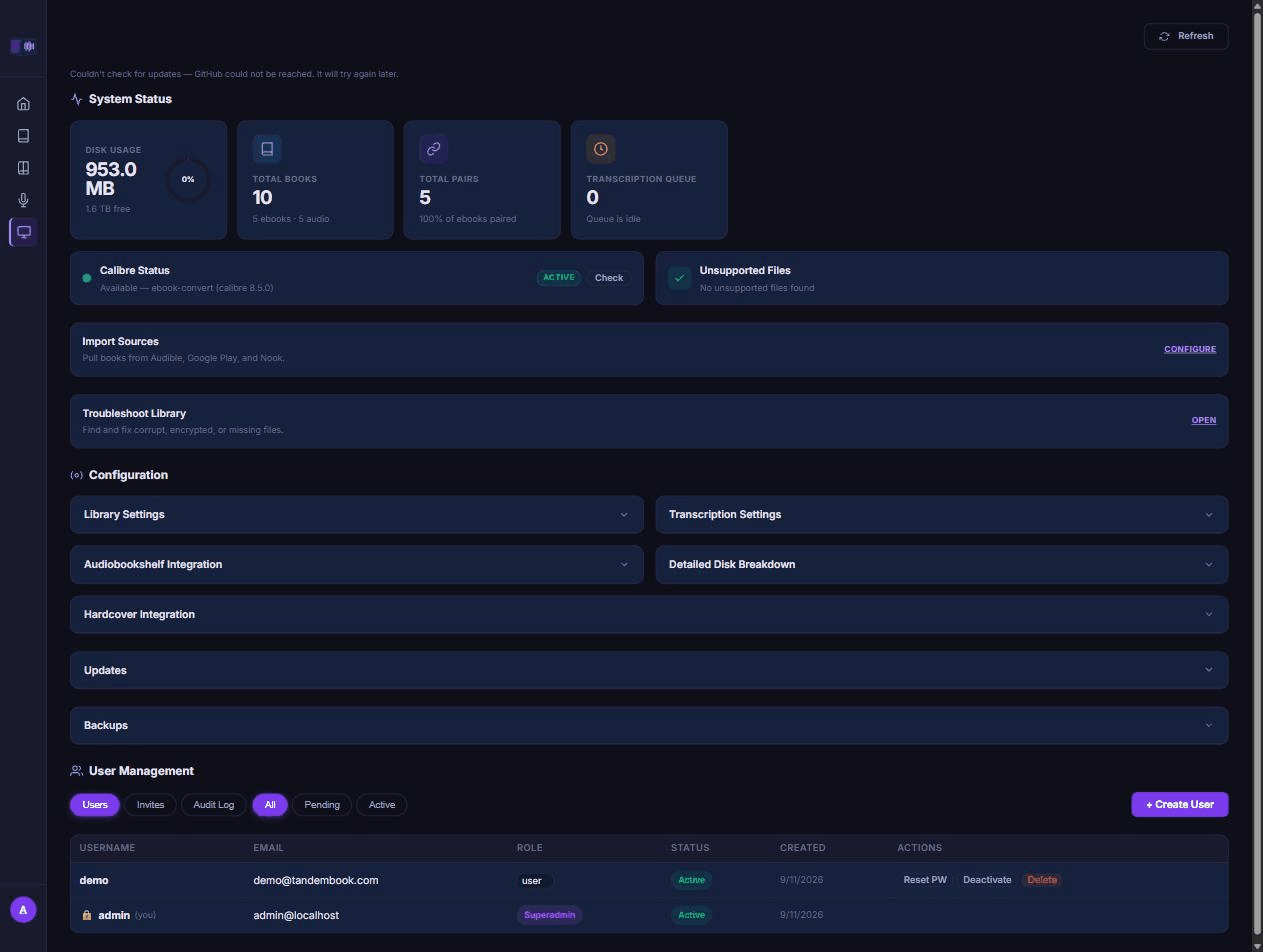
A brand-new install seeds registration in invite mode: the login page shows a request form that also asks for an invite code. Create one from System → User Management → Invites and hand the code to whoever needs an account. Switch to open or closed registration from System → Settings if invite mode is not what you want.
7. Put a reverse proxy in front
Nothing inside the stack terminates TLS or sets browser security headers. Copy the Caddy template, change the hostname, and reload:
cp Caddyfile.example /etc/caddy/Caddyfile
caddy validate --config /etc/caddy/Caddyfile && systemctl reload caddy
Bind the server and web ports to 127.0.0.1 (or your LAN firewall) so nothing can reach
them around the proxy.
8. Scan your library and check backups
System → Troubleshoot Library → Run Verification Scan walks the mounted directories, extracts metadata and auto-pairs what it can match. Backups run on their own nightly schedule; open System → Backups to see the last run and take a manual one, and restore from the same page if you ever need to.
Sync between an ebook and its audiobook needs a transcript for each pair — that is the next page: Set up transcription. Once pairs are transcribed, browse your library.
Why it is like this
Secrets are files, not environment variables. docker inspect prints a container's whole
environment, and so does /proc/1/environ — readable by anyone in the docker group and by
anything that reaches code execution inside the container. A file mounted at /run/secrets/ is
readable only by the container's own user.
The containers run as an unprivileged uid, matched to your library via PUID/PGID.
server is internet-facing and shells out to Calibre, ffmpeg and rsync against every mount it
holds — both library roots and the backup share, all read-write. As root, one path bug reaches
all of it at once; as your own uid, it can only touch what that uid could already touch.
Registration is invite-only by default. A stranger who reaches the login page should not create an account without someone's say-so, so a new install starts that way; open it up or lock it down further once you decide who should have access.
A reverse proxy sits in front for TLS and security headers, because nothing inside the stack
does either. The web app keeps its session tokens in localStorage, so the headers that limit
what an injected script can do have to come from somewhere in front of it.
The server runs as a single process. The transcription queue's claim, its cancel/pause state, and the backup and import schedulers all live in that one process's memory. A second worker would claim the same job twice, which is why the server refuses to boot with more than one.