Set up transcription
Sync between an ebook and its audiobook only works once the audiobook has been transcribed and the transcript aligned to the ebook text. This page covers picking a transcription route, deploying it, and what to expect once jobs are running.
Before you start
- A Tandem server already installed and running — see Install the server.
- Somewhere to transcribe: either a CUDA GPU host on the same network (the Jetson Orin Nano 8 GB
is the reference; the
mediummodel uses about 5 GB while a job runs, so give a smaller card thesmallmodel) or a server image built with the local Whisper stack, which is multi-GB and slow without a GPU. - Transcription is optional. Without it you still get a library, an EPUB reader and an audio player — you just do not get cross-format position sync.
Steps
1. Choose a route
Two options, and the remote worker is the recommended one:
- Remote GPU worker — a separate host, on the same LAN or VPN, running the Jetson
transcription server. Set
TRANSCRIPTION_PROVIDER=remote(or leave the defaultremote_with_fallback, which behaves the same on a server image with no local Whisper). - Local Whisper, built into the server image itself:
bash
  docker compose build --build-arg INSTALL_LOCAL_WHISPER=1
The torch + openai-whisper CUDA wheels this pulls in are multi-GB, and without a GPU on
the server host, transcription runs on CPU and is slow.
The default server image ships with no local Whisper stack at all, so remote_with_fallback on
that image has nothing to fall back to — it behaves as remote and retries the worker instead
of erroring on the fallback leg. Use remote explicitly unless you have built with
INSTALL_LOCAL_WHISPER=1.
2. Deploy the remote worker (recommended route)
The worker is a separate checkout on its own host — it needs only the jetson/ directory:
git clone --filter=blob:none --sparse https://github.com/jlafuenti/Book-Sync.git tandem-jetson
cd tandem-jetson
git sparse-checkout set jetson
cd jetson
cp docker-compose.example.yml docker-compose.yml
Generate the shared API key from the main server's System → Transcription Settings → Remote Server API Key, then paste it into the worker's compose file — the two are compared byte for byte, so they must match exactly:
# jetson/docker-compose.yml
environment:
  - TRANSCRIPTION_API_KEY=<paste the key here>
Deploy:
docker compose up -d --build
First boot downloads the Whisper model, so it can take a few minutes.
3. Point the server at the worker
Back in Tandem, under System → Transcription Settings:
- Remote URL:
http://<worker-lan-address>:9000 - Remote Server API Key: the same value from step 2
- Click Test Connection — it should report GPU and model status. "Model: Not Loaded" is
normal for an idle worker; a
401means the two keys do not match.
4. Queue a book
Queue a pair from the Transcription page, or turn on auto-transcribe so newly matched pairs
queue themselves. One job runs at a time; the rest wait as pending.
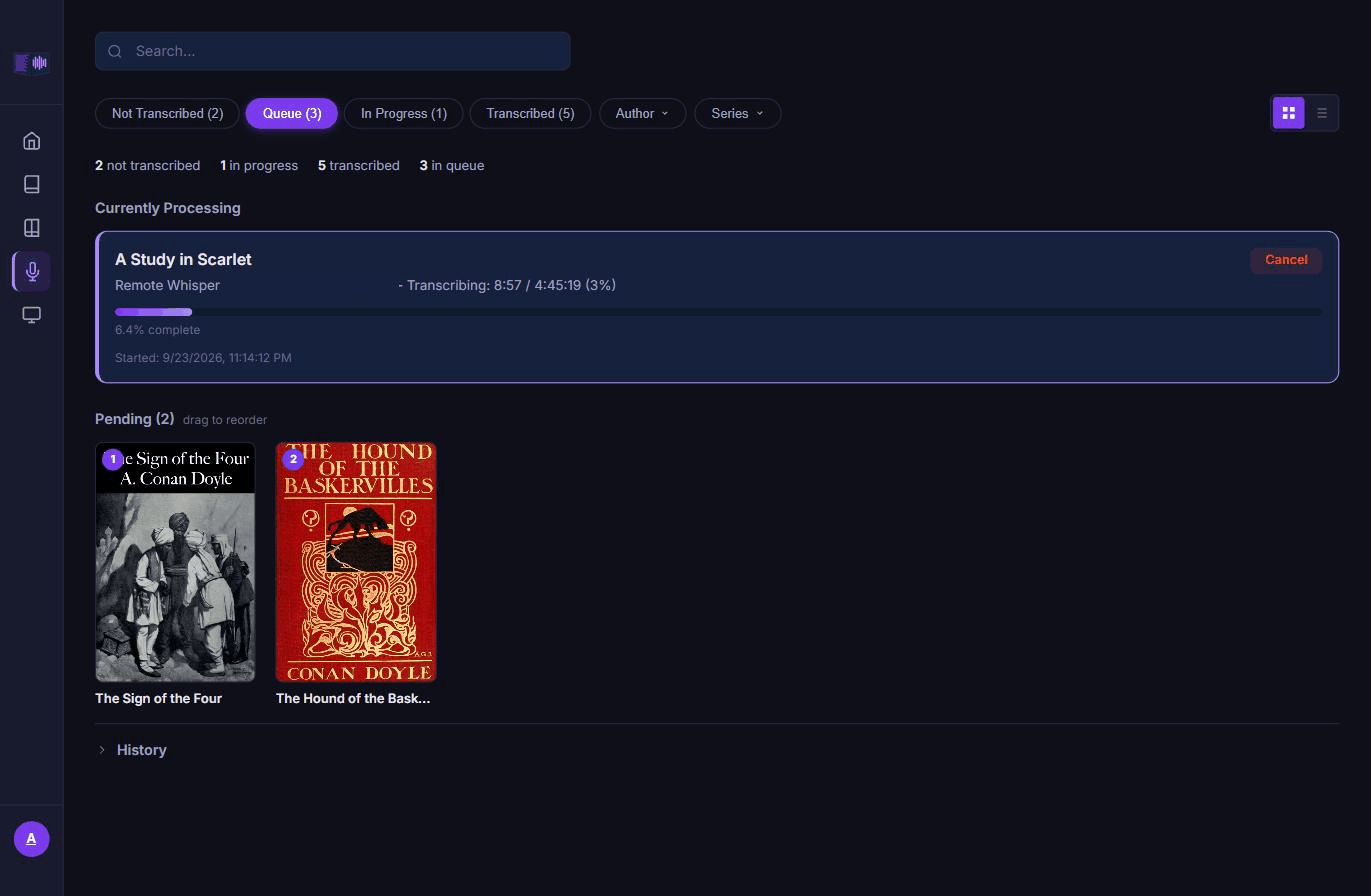
5. Set expectations, and an off-hours window if you want one
There are no published timing numbers — transcription time depends on device (GPU vs CPU), model size and audio length, so time your first real book and extrapolate from there.
If the GPU is shared with something else, restrict dispatch to a window from System → Transcription Settings → Only transcribe during off-hours — a running job pauses at its next checkpoint when the window closes, and resumes without losing progress or burning a retry.
6. Fix a poor alignment
If a book's handoff lands in the wrong place, rebuild its map before you re-transcribe: open View Alignment on the book from the Transcription page and use Re-align, or run the Sync-Map Audit on System → Troubleshoot Library to check every pair at once. Either rebuilds the map from the cached transcript on the server's CPU in minutes, with no worker involved. Only a job that failed outright needs a Re-queue.
7. Keep the worker in step with the server
The System page's Updates card flags when the worker falls behind the server's version. Upgrade it the way you deployed it — check out the matching tag on the worker host and rebuild:
git fetch --tags && git checkout v<version>
docker compose up -d --build
Why it is like this
A separate GPU worker is the recommended route because the default server image carries no
local model at all. The torch + openai-whisper CUDA wheels a local install needs are
multi-GB, so they are opt-in at build time. A dedicated worker also keeps transcription load off
the server's own CPU and memory, and it can be a small always-on box like an Orin Nano rather
than a full workstation.
One job runs at a time, and a book takes hours, because the queue is deliberately serial. There is no published per-book number because the honest answer depends on your hardware — device and model size dominate, and audio length scales roughly linearly with cost. Time your first book on your own setup rather than trusting someone else's figure.
The worker requires a shared API key on every request, including its own health check,
because anyone who can reach its port could otherwise submit jobs or read other users' cached
transcripts. The key is checked byte for byte, which is why Test Connection exists: a mismatch
shows up immediately as a 401 rather than as a mysterious failure hours into a job.
The off-hours window exists because a GPU is often shared with something else on the same box. Pausing a running job at its next checkpoint, rather than simply refusing new work, is what keeps a job that is already most of the way through a long book from losing progress when the window closes underneath it.
Re-alignment is separate from transcription because alignment is fuzzy matching, not a guarantee. The transcript is banked once; the map that ties it to the ebook can be rebuilt from it whenever the ebook changes or the match came out poor, in minutes rather than the hours a transcription takes.